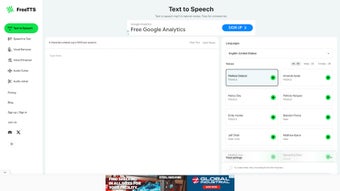

Download FreeTTS – Free Online Text‑to‑Speech Converter
Overview – What Is FreeTTS?
FreeTTS is a premier online text‑to‑speech (TTS) converter that lets you transform any written content into natural‑sounding audio in just a few clicks. Powered by Google’s advanced machine‑learning models, the service delivers lifelike voices across a broad spectrum of languages, from English (US) and Afrikaans to Arabic and Bulgarian. Because it runs completely in the browser, there is no need to download bulky desktop applications or sign up for a subscription. Simply paste your text, select a voice, tweak the speech parameters with SSML (Speech Synthesis Markup Language), and hit “Convert.” The resulting MP3 file can be downloaded instantly, making FreeTTS ideal for video voice‑overs, AI‑generated podcasts, e‑learning modules, promotional clips, and any project that benefits from high‑quality audio narration. The platform’s user‑friendly interface, secure cloud processing, and zero‑cost model have quickly positioned it as a go‑to tool for creators, marketers, educators, and developers who need a reliable, fast, and free TTS solution.
Key Features That Set FreeTTS Apart
- AI‑Driven Natural Voices: Leverages Google’s state‑of‑the‑art neural TTS engine to produce speech that mimics human intonation, rhythm, and emphasis.
- Multilingual Support: Offers native‑sounding voices in more than 20 languages and dialects, including English (US/UK), Afrikaans, Arabic, Bulgarian, Chinese, French, German, Hindi, Italian, Japanese, Korean, Portuguese, Russian, Spanish, and many more.
- SSML Compatibility: Allows advanced users to embed SSML tags for precise control over pauses, emphasis, pronunciation of dates, acronyms, numbers, and custom phonetics.
- Instant MP3 Download: Generates a high‑quality MP3 file that can be saved with a single click—no registration, no watermarks.
- Secure Cloud Processing: All text is transmitted over HTTPS and processed in Google’s secure data centers, ensuring privacy and compliance with modern data‑protection standards.
- Responsive Web Design: Optimized for desktop, tablet, and mobile browsers, so you can create audio on the go from Windows, macOS, Android, or iOS devices.
- Free Forever Model: Unlike many competitors that lock premium voices behind a paywall, FreeTTS provides full access to its core voice library at no cost.
- API‑Ready Output: While the web UI is the primary interface, the generated MP3 files can be programmatically integrated into workflows via simple HTTP requests.
The combination of these features makes FreeTTS a versatile tool for a wide range of use‑cases. Content creators can quickly generate narration for YouTube videos without hiring voice talent. Educators can produce audio versions of lesson plans, making material more accessible for students with reading difficulties.
Marketers can spin up promotional clips in multiple languages to reach global audiences. Even developers can embed the service in custom applications, leveraging the free, high‑quality output for chatbots, virtual assistants, and accessibility tools. The platform’s emphasis on simplicity—no sign‑up, instant download, and clear UI—means you spend less time fiddling with settings and more time focusing on the content that matters.
Step‑by‑Step Installation & First‑Time Usage
Because FreeTTS is a web‑based solution, there is technically no installation required on your computer. However, a few preparatory steps can help you get the most out of the service and ensure a smooth workflow.
1. Open the FreeTTS Website
Launch any modern browser (Chrome, Edge, Firefox, Safari) and navigate to the official FreeTTS homepage. The site automatically detects your device and serves an optimized layout for desktops, tablets, or smartphones.
2. Choose Your Language and Voice
From the drop‑down menus, select the language you need. Each language presents a list of available voices—typically a mix of male and female options. Hover over a voice name to hear a short preview; this helps you pick the tone that best fits your project.
3. Enter or Paste Your Text
In the large text box, type or paste the content you wish to convert. FreeTTS supports up to 5,000 characters per conversion, which is sufficient for most short‑form videos, podcasts, and e‑learning modules. For longer scripts, you can split the text into multiple batches and download each MP3 separately.
4. Fine‑Tune with SSML (Optional)
If you need precise control over speech cadence, insert SSML tags directly into your text. For example,
5. Generate the Audio
Click the “Convert” button. Within a few seconds—depending on the length of your text—FreeTTS processes the request on Google’s cloud servers and presents a playback widget with the generated audio. Use the built‑in player to verify the output before downloading.
6. Download the MP3 File
Once you’re satisfied, hit the “Download MP3” button. The file is saved directly to your device’s default download folder. Because the file is already in MP3 format, it’s ready for immediate use in video editors, podcast platforms, or any audio‑capable application.
7. Re‑Use and Share
The downloaded MP3 can be uploaded to YouTube, added to PowerPoint presentations, embedded in web pages, or distributed via email. Since there are no usage restrictions, you are free to reuse the audio in commercial projects, educational materials, or personal experiments.
In summary, FreeTTS requires no installation, no registration, and only a few clicks to produce professional‑grade speech. The intuitive workflow makes it accessible to beginners while still offering advanced SSML capabilities for power users.
Platform Compatibility, Pros and Cons
FreeTTS runs entirely in the browser, which means it is compatible with all major operating systems that support modern web standards. Whether you are on Windows 10/11, macOS Monterey or later, Linux distributions with a recent Chrome/Firefox/Edge browser, or on mobile platforms such as Android 9+ and iOS 13+, the service works flawlessly. The responsive design ensures that the UI scales appropriately on tablets and smartphones, making it possible to create audio on the go without sacrificing functionality.
Pros
- Completely free with no hidden fees or subscription tiers.
- High‑quality, natural‑sounding voices powered by Google’s AI.
- Extensive language and voice selection, suitable for global audiences.
- SSML support for detailed speech customization.
- Instant MP3 download without watermarks or registration.
- Secure HTTPS transmission and cloud processing.
- Responsive web interface works on Windows, macOS, Linux, Android, and iOS.
- No software installation; works on any modern browser.
Cons
- Maximum character limit per conversion (5,000 characters) may require splitting longer scripts.
- Advanced SSML features require some learning curve for non‑technical users.
- Since the service is web‑based, an internet connection is mandatory.
- Limited batch processing; users need to manually start each conversion.
- No native desktop client for offline use.
Overall, the advantages of FreeTTS far outweigh its minor drawbacks. For most creators and professionals, the free price point, ease of use, and high audio quality make it a compelling alternative to paid TTS platforms.
Conclusion – Should You Download FreeTTS?
If you are looking for a reliable, high‑quality text‑to‑speech solution that won’t cost you a dime, FreeTTS checks all the boxes. Its AI‑driven voice engine delivers clear, natural speech across a wide array of languages, while the web‑only architecture eliminates the hassle of installations and updates. The inclusion of SSML gives power users granular control, and the instant MP3 download streamlines the workflow for video editors, podcasters, educators, and marketers alike. Although the character limit per request and the lack of an offline client may be limiting for some heavy‑duty users, these constraints are more than compensated by the platform’s ease of access and zero‑cost model.
In short, FreeTTS is an excellent choice for anyone who needs quick, professional‑grade audio without breaking the budget. Whether you are a beginner experimenting with voice‑overs or a seasoned developer integrating TTS into an application, the service provides the flexibility, quality, and convenience required in today’s fast‑paced digital environment.
Frequently Asked Questions
Is FreeTTS really free, or are there hidden charges?
FreeTTS is completely free for all users. There are no subscription tiers, no pay‑per‑use fees, and no hidden charges. You can generate and download MP3 files without ever providing payment information.
Do I need to create an account to use FreeTTS?
No. FreeTTS operates without user registration. Simply visit the website, paste your text, choose a voice, and start converting.
What audio formats does FreeTTS support?
The service currently provides output exclusively in MP3 format, which is widely compatible with virtually all media players, video editors, and publishing platforms.
Can I use FreeTTS for commercial projects?
Yes. The generated audio files can be used in commercial videos, advertisements, e‑learning courses, and any other profit‑making venture without licensing fees.
Is my data safe when I upload text to FreeTTS?
All communications are encrypted via HTTPS, and the text is processed on Google’s secure cloud infrastructure. FreeTTS does not store or share your content beyond the duration of the conversion.
Ready to Transform Your Text into High‑Quality Speech?
Click the button below to launch FreeTTS in a new tab, start converting your first piece of text, and download the resulting MP3 instantly. Experience the power of AI‑driven voice synthesis without spending a cent.
Start Converting with FreeTTS Now
Pros: Free, high‑quality AI voices, multilingual, SSML support, instant MP3 download.
Cons: 5,000‑character limit per request, no offline client.



.png)



